A table that opens fast is a table people actually check. We’ve just made linked tables open faster, up to 3.5x faster for the largest ones. It’s also a good excuse to talk about a feature many of you haven’t tried yet.
Linking two tables, in practice
In RowShare, a “Row from another table” column links a row of one table to a row in another table. The columns you pick from that second table then show up right in the first one.
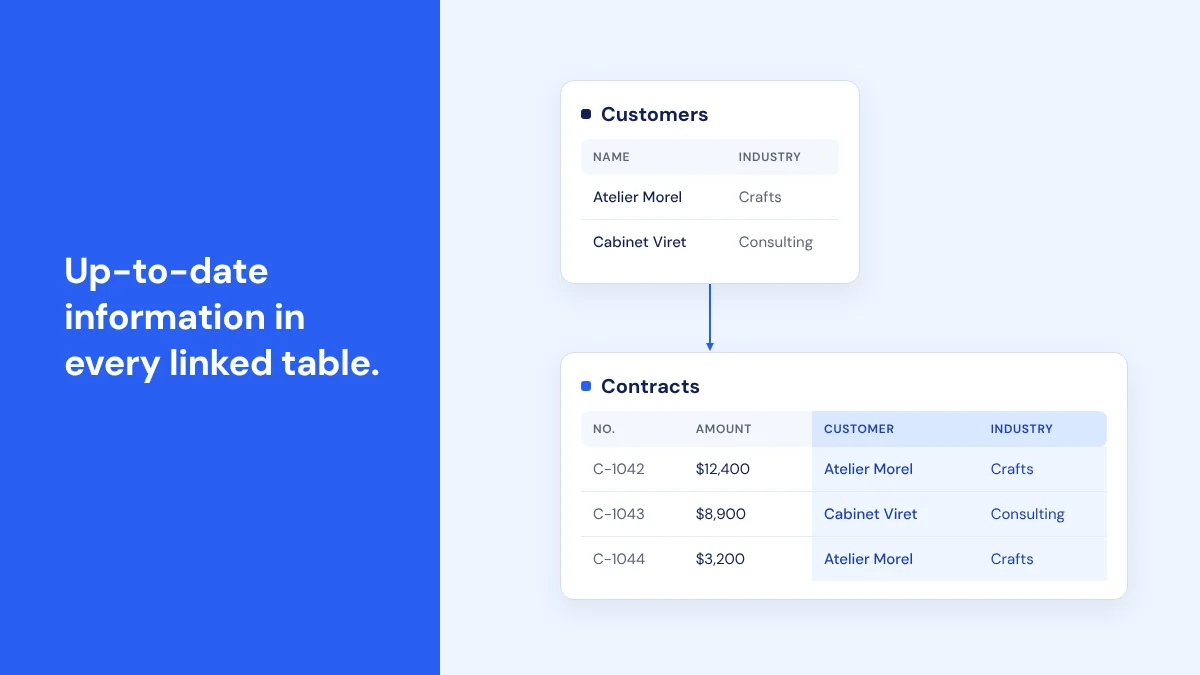
Say you have a Contracts table and a Customers table. For each contract, you pick the customer, and their name, address or industry appear next to the contract. Nobody typed them in again. If a customer moves, you update the address once in Customers, and Contracts shows the new one right away.
We call the table that provides the data (Customers here) the parent table, the one that displays it (Contracts) the child table, and the borrowed columns parent columns.
The same setup works for orders and customers, applications and open jobs, tasks and their project, assignments and the consultant handling them. You can even go one step further: a Deadlines table linked to Contracts can show the customer’s industry, which was only ever entered once, in Customers.
Coming from Excel? You’ve probably done this with a VLOOKUP: you type the customer, and the formula fetches the rest. Here, you pick the customer from a list, and RowShare shows the rest, with no formula to write or copy down.
Setting up a link
It takes a few minutes.
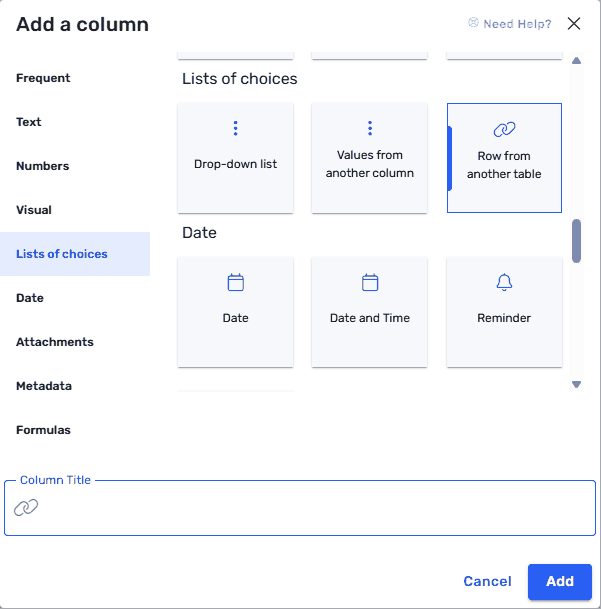
- In the child table (Contracts, in our example), add a column, pick “Row from another table” in the “Lists of choices” category, give it a title and click Add.
- In the column settings, choose the parent table, Customers here.
- Pick the columns to display and click the arrow to select them.
- Go back to the table (you may need to refresh the page). The new columns sit on the far right, grouped together and still empty.
- Double-click one of them. RowShare lists the customers you have access to, with a search bar to get there faster.
When the customer list gets long, the column’s Advanced options let you filter or sort it. The one rule to know: no loops. If Contracts links to Customers, Customers can’t link back to Contracts.
The full walkthrough, with screenshots, is in the help center: Creating a link between the rows of two tables.
What changed on the speed side
To display a linked table, RowShare has to look up the parent table’s data, row by row. The bigger the table, the longer that takes. RowShare now finds these matches much more efficiently.
We timed real tables before and after the release.
- On the largest linked tables, opening is up to 3.5x faster. A table with more than 11,000 rows that used to take nearly 9 seconds now opens in 2.5 seconds.
- On mid-size linked tables, you gain 10 to 20%.
- No impact on tables without links.
There’s nothing to turn on: the speed boost is already live.
What’s next
Our next project: tables with lots of formulas. We’ll tell you more when it’s ready.
If you’ve never linked two tables, start with what you already have: two tables you use separately, and a column you keep copying from one to the other. That’s usually a good candidate. The guide walks you through it, and our team can help you organize your tables if you’d rather not do it alone.
Linked tables: frequently asked questions
What does a “Row from another table” column do?
It links a row of a RowShare table (the child table) to a row in another table (the parent table), and displays the parent columns you choose in the child table. Nothing gets typed twice.
If I edit the parent table, does the child table follow?
Yes, the change shows up in the child table in real time. That’s the whole point: each piece of information is corrected in one place.
How is it different from “Values from another column”?
“Values from another column” is a drop-down list fed by a column of another RowShare table. “Row from another table” links the whole row and can display several columns from the parent table.
Can I chain more than two tables?
Yes, a parent column can be shown in a third table, for example Customers, then Contracts, then Deadlines. RowShare only refuses loops, where a table would end up linked to itself.
Do I need to do anything to get the speed boost?
No, it’s already live on linked tables. The largest ones open up to 3.5x faster, mid-size ones 10 to 20% faster, and there’s no impact on tables without links.